Viewing Other Technology Scores
The Technology Vulnerability Score page shows all technology vulnerability score across all scans imported and uploaded for your Team Subpackage. The data points are collected per scan and the report shows the date on the bottom of the chart. You can get to this from the Team Subpackage dashboard using the Other Technologies menu button.
You also can click the Score menu option on the Other Technologies pages within your team subpackage area.
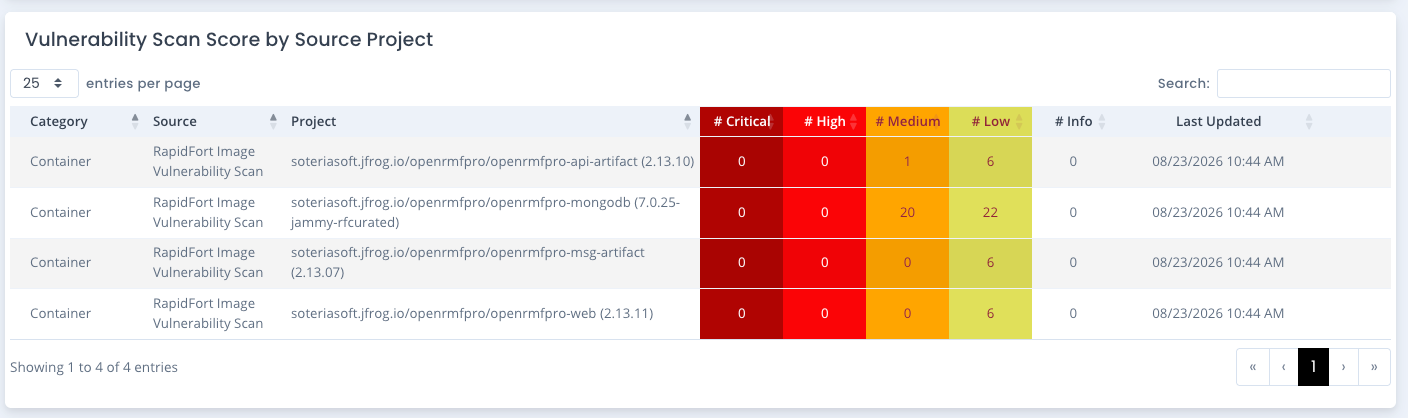
The Technology Vulnerability Scores per category, source and project can be viewed in a table separating out the scores. Click on the linked project (if available) to view any history of scores for that source project. As with any chart in this application, click on the legend to turn off/on the data. And move your house over the data to show detailed information for that point on the chart. You also can download the chart to a JPG with the bottom right button.
Specifically for container images, we track changes based on the image tag. The full image repository URL being the same, a new tag will show changes of vulnerabilities opened and closed and the history along the way.
Deleting a Source Project from a Technology Vulnerability Scan
If you have the Vulnerability Administrator permission in your team subpackage, you can delete a source project that was incorrectly scanned or uploaded by clicking the ... menu on the far right of the source project row and selecting Delete Source Project Scans. This deletes and removes the vulnerability entries for that source and project for that category across the score, data, and history. Scan data is stored once for the whole system package, so this removes it from the system package as well, not just from your team subpackage.
The source project stays assigned to your team subpackage after the delete, so you can upload a corrected vulnerability scan for it right away.
If another active team subpackage is also assigned the same source project, the delete is refused and the message names that team. A system package Vulnerability Administrator can delete a shared source project from the system package Vulnerability Scores page.
When deleting the source project from this screen, you can enter a delete comment that will be added to any POAM item marked as “Completed” based on its link to any open vulnerabilities from this source project.