Elastic Security / SIEM Service Provider Interface
The Elastic Security / SIEM SPI allows using the Security Incident & Event Management (SIEM) components and Machine Learning (ML) Anomaly components in Elastic to actively track compliance. And uses that data to update your cyber compliance in OpenRMF® Professional.
Integration with this SPI allows updating certain compliance statements (AC-2, AU-8, etc.) for all SIEM enabled system packages with relevant data from the SIEM. It also allows updating other auditing, continuous monitoring, and related compliance statement for a particular system package based on the unique hostname associated with any information related to your OpenRMF® Professional installation.
Prerequisites for the Elastic SIEM Service Provider Interface
For the Elastic SIEM SPI you must be running at a minimum OpenRMF® Professional version 2.14.02 or higher. The 2nd patch of OpenRMF® Professional included additional external API calls required for this integration. This Elastic SIEM SPI is set up and installed on the same machine as your OpenRMF® Professional installation as it connects to and uses that software.
You must also have Elastic 9.4.x or higher with Enterprise or Platinum licensing active and the Security feature active and enabled.
Setting up Your Elastic SIEM Service Provider Interface
To setup your Elastic SIEM SPI you must first have the Service Provider Interface enabled in your application settings. And you must have the latest NATS credentials created with your installation / upgrade to use the proper *.creds file in your setup. See the installation guide for more information.
Next go to the Administration – Manage Service Provider Interfaces menu option. And then click the Elastic Security (SIEM) Service Provider Interface link to load the form shown below.
On this form you must enter several items required to test and then use your Elastic SIEM SPI. The left section deals specifically with your setup in your Elastic cluster. For more information see the Elastic Security (SIEM) Installation Guide.
- The root Elasticsearch API URL for your cluster
- The root Kibana API URL for your cluster, similar to the above but usually a
.kb.versus a.es.in the URL - Your Elastic API Token for the user to connect, with access rights to create proper indexes based on the SiteKey (see the Elastic SIEM SPI installation manual)
- Optionally, the certificate fingerprint if your SSL Certificate is made by a private Certificate Authority (CA)
- Define how often the task runs to check the ML Anomaly endpoints, default 30 minutes
- Enabled or disable creating the default jobs and running them
- Enable or disable creating custom jobs and running them
The right section deals specifically with your OpenRMF® Professional setup.
- The root of the External API, usually your same
https://root and then/api/external/on the end - The chosen External API application Key
- The External API token for the application Key used (or generate one by clicking the link) – lasts up to 1 year
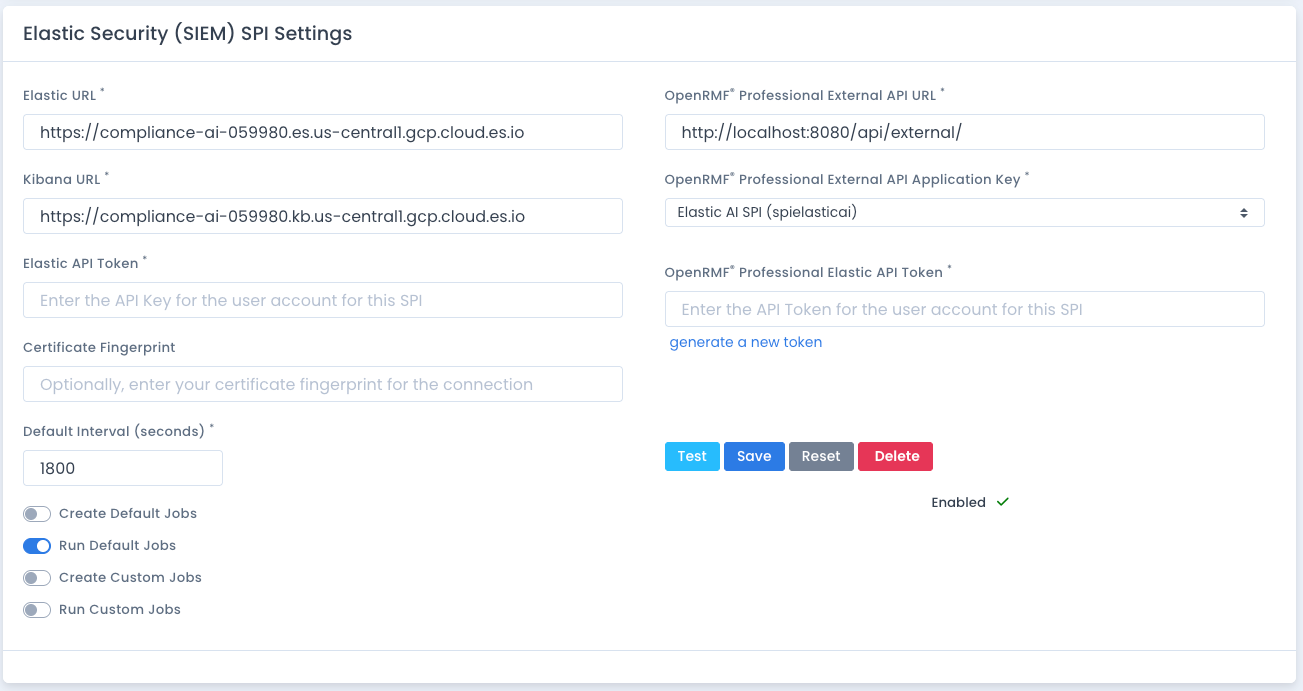
These settings are used when the Elastic SIEM SPI is first started, as it reaches out to your OpenRMF® Professional installation for these initial startup settings. You also can update the settings while the Elastic SIEM SPI is running and it will update the settings in memory for the next time the SPI is run.
How it Works
The Elastic SIEM SPI connects to your OpenRMF® Professional installation and reads the configuration set for this SPI. It then verifies that the Elastic cluster connection has Elastic Security enabled.
Once verified, it runs through several CCI compliance statement updates listed in the Automated CCI updates below. For each of them, it calls the OpenRMF® Professional external API for all SIEM compliance statement updates and sends the canned statement with Open status to all SIEM enabled system packages. These statements sent “because you are running Elastic Security” are sent once a day automatically to keep the information up-to-date. See the note below on how the compliance statement is created or updated accordingly.
Additionally, there are Machine Learning Anomaly jobs setup for various CCIs and Controls for your frameworks across all system packages. Those jobs are defined in the Elastic SIEM Installation Guide and are called on their own schedule when it overlaps with the Default Interval from your Elastic SIEM SPI settings. These jobs are run and call ML Anomaly API endpoints according to the job definitions. When certain anomaly records in the timeframe have scores at or above the set minimum score, the hostname is used to search the proper system package setup from the integration. And then if found, that system package compliance statement for the CCI is updated with relevant information as well. See the note below on how the compliance statement is created or updated accordingly.
When any CCI is set for an update, the Elastic SIEM SPI calls the configured External API with the proper application key, token, and values to update the CCI. It sends it to the external API which in turn calls the internal API within OpenRMF® Professional. If the compliance statement is not present for that specific system package or all SIEM system packages, it creates it and marks it as Open. If it is present, and not locked, it updates it. If it is present and locked, it skips it. Then returns back to the Elastic SIEM for the next action.
Automatic Control Correlation Identifier (CCI) Compliance Updates
The fact that you are running Elastic Security allows answering several CCIs listed below across all system packages that have “SIEM enabled” in their System Package Preferences turned on.
Auditing Related Control Correlation Identifiers
These are auditing CCIs related to things such as (but not limited to) controls such as RMF/FedRAMP/GovRAMP AU-3, CMMC AU.L2-3.3.7 and CJIS AU 5.4.4.
- CCI-000159
- CCI-001888
- CCI-001889
- CCI-001890
Access Control Related Control Correlation Identifiers
This is an access control CCI related to things such as (but not limited to) RMF/FedRAMP/GovRAMP AC-2, CMMC AC.L1-3.1.1, several CSF controls, and several CJIS controls.
- CCI-002122
Continuous Monitoring Related Control Correlation Identifiers
This is a ConMon type of control related to things such as (but not limited to) RMF/FedRAMP/GovRAMP SI-4(4), CMMC SI.L2-3.14.6, and CJIS 5.10.1.3.
- CCI-002661
- CCI-002662