Run the Device Profile Check Report
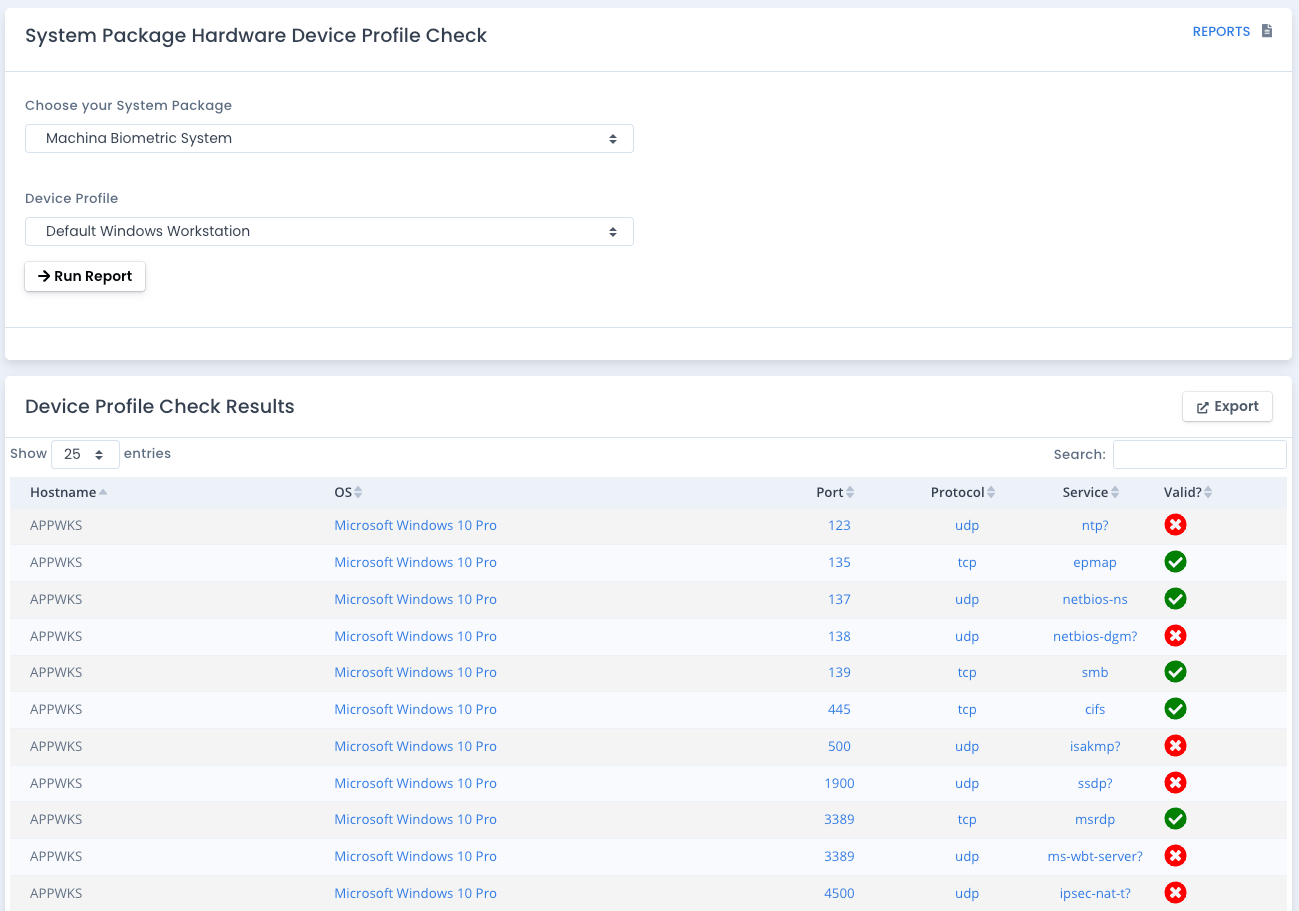
This report lists the devices in a system package that have the selected device profile and shows how each of their ports/protocols/services matches up to the approved listing. Any that are valid are shown with a green checkmark. Any that do not fall into the mix are marked with a red X.
A device can have more than one device profile. Each device is checked against the combined approved listing of all of its profiles, not only the one you selected, so a Web Server that also carries a Database Server profile shows its database port as valid. The Device Profiles column lists every profile on the device and the Approved By column names the profile(s) that allow that entry.
Choose [All Device Profiles] to run the report for every device that has at least one device profile.
Where the Data Comes From
This data from all hardware assets in a system package and their ports, protocols, and services (PPS) found by scans or uploaded via bulk upload. PPS entries that have been removed from the system package are not included. It compares them to the device profiles on each device to show valid PPS and deviations. The XLSX download has the same columns as the table plus the operating system of each device.
Why Run this Report
List all devices specified by a device profile and see where they are compliant and non-compliant for a particular system package within OpenRMF® Professional.